Knowledge Base Q&A
Click Knowledge Base in the left menu to enter the Q&A view: the knowledge base list on the left, the Q&A area on the right. This is the entry for asking a knowledge base directly; you can also link the base to a character and use it in chat (adding persona and memory on top).
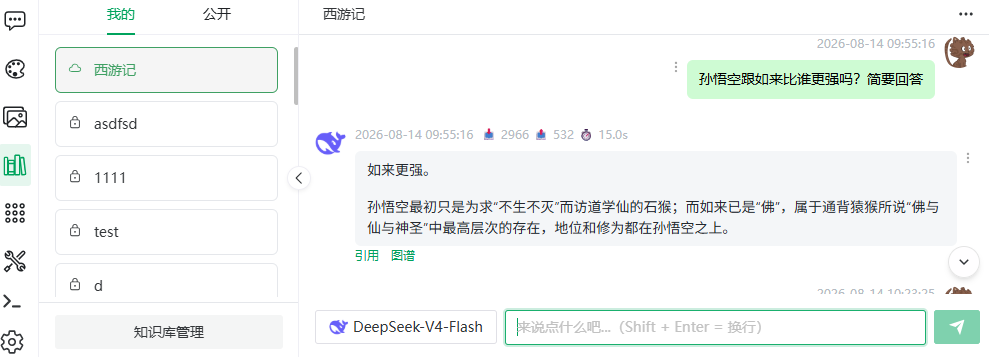
Picking a Knowledge Base
Two tabs in the sidebar:
| Tab | Content |
|---|---|
| Mine | Bases you created (including private) |
| Public | Site-wide public bases |
- Icons: cloud = public, lock = private;
- Click the i button on an entry for the details dialog — the tag tooltips (translated):
| Tag | Tooltip (translated) |
|---|---|
| Public / private | Public: visible and usable by everyone; private: visible and usable by the creator only |
| Strict / lenient | Strict: strictly match the knowledge base; no search result → "no answer" directly. Lenient: no search result → pass the question to the LLM to continue |
| Max recall count: N | The number of recalled documents cannot exceed this value in vector search |
| Min recall score: N | Recalled vector scores must be greater than this value |
The dialog also shows document and vector counts, and Clear history ("Irrecoverable after deletion — proceed with care").
The Knowledge base management button at the bottom of the sidebar opens My knowledge bases.
Asking
- Pick an answering model in the top selector;
- Type and send;
- The answer streams in; Stop interrupts;
- Scroll up to page through history ("No Q&A records yet" when empty).
TIP
Asking tips: retrieval drives quality — phrase questions close to the document wording, one question at a time, and add qualifiers (year, product, department) when needed.
NOTE
In strict mode, "[No answer]" on no hits is expected behavior (the model will not make up an answer). For free-form answers switch to lenient mode (see Create & Configure).
Citation Tracing
Under the answer:
- Citations: hit segments per segmentation mode:
| Segmentation mode | Shown |
|---|---|
| Q&A | Hit question + answer |
| Parent-child | Hit child + its parent |
| Plain | Segment text |
- Graph: knowledge graph fragments referenced by the answer.
Deleting Q&A Records
- Hover the record and click delete;
- Confirm ("The question and its answers will be deleted together. Continue?").
For bulk cleanup use Clear history in the details dialog.
API
More → API in the top bar generates this base's API key and endpoint docs — see API Reference · Knowledge Base Q&A.
Previous: Knowledge Graph · Next: Apps & Workflows