Knowledge Base Overview
A knowledge base (RAG) gives the AI access to your own material: imported documents are split into segments and indexed; when you ask, the system retrieves the most relevant segments and injects them into the model, grounding answers with traceable citations.
Good use cases: policy Q&A, product-manual support, personal notes search, domain assistants.
Overall Flow
Create knowledge base → Import documents (pick segmentation mode) → Index (vectorize / graph) → Q&A or link to a character| Step | What | See |
|---|---|---|
| 1. Create | Retrieval and segmentation settings | Create & Configure |
| 2. Import | Form entry or file upload, choose segmentation mode | Import Documents |
| 3. Index | Vectorization (required) and graph extraction (optional) | Import Documents |
| 4. Maintain | Segment enable/disable, QA maintenance, retries | Segment Management, Q&A Import & Generation |
| 5. Use | Knowledge base Q&A, or link the base to a character | Knowledge Base Q&A, Character Settings |
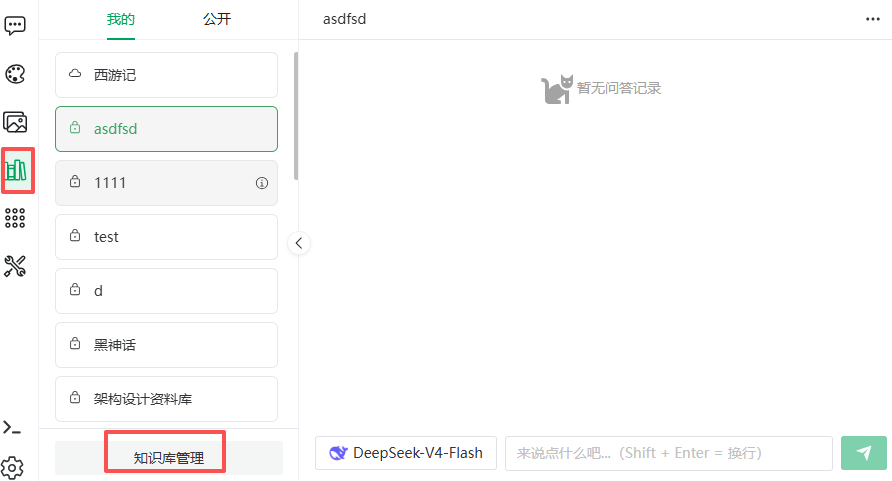
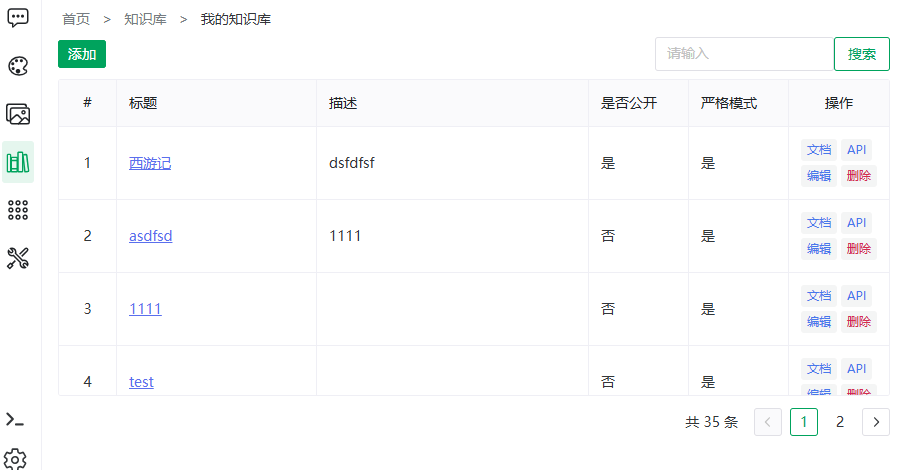
Two Entry Points
- Knowledge base Q&A: the Knowledge Base menu item — pick a base and ask;
- Knowledge base management: the Knowledge base management button at the bottom of the Q&A sidebar (or visit the "My knowledge bases" page directly) — creating and maintaining.
Three Segmentation Modes
The segmentation mode decides how documents are segmented and retrieved. It is a document-level property — chosen when importing or editing a document; one knowledge base can mix modes.
| Mode | Best for | Retrieval |
|---|---|---|
| Plain segmentation | Continuous text: manuals, articles | Auto-segmented per the base's segmentation strategy; semantic similarity recall |
| Q&A | Paired content: FAQs, support scripts | Question-answer pairs; hitting any question recalls the answer |
| Parent-child | Long, hierarchical documents | Small chunks (children) match precisely; the hit returns its parent (larger context) to the model |
How to choose:
- Material is naturally question-answer → Q&A (highest accuracy, but requires reformatting);
- Continuous prose with clear paragraphs → plain (easiest);
- Long documents needing both precise hits and full context → parent-child (e.g. a manual: child hits a spec item, parent returns the section).
NOTE
Q&A mode only imports XLSX / XLS / CSV files; parent-child mode has its own child chunk max-length setting (default 200).
Segmentation Settings vs Segment Mode
Segmentation parameters and the segment mode live on two orthogonal levels; the pipeline is "cut segments first with the base-level segmentation settings, then organize the segments per the document-level mode":
- Segmentation settings (knowledge-base-level) — the Document Segmentation Settings configured on the base (segmentation strategy, max segment length, segment overlap length, custom separator, token estimator) decide where the cut points are; they apply to every document in the base;
- Segment mode (document-level) — each document chooses how to organize the segments:
- Plain segmentation: each segment is vectorized and retrieved directly;
- Parent-child: the segment serves as the parent; smaller child chunks (at the document's child chunk size) are split inside the parent, only children are vectorized, and a hit returns its parent;
- Q&A: pairs are generated from the body text by AI (questions vectorized, answers returned as-is), with the generation window split at the base-level max segment length. Importing pair files (XLSX/CSV) skips splitting entirely — the only exception.
TIP
Naming convention: the top-level split output is always a segment (plain segment / parent / answer segment); only parent-child mode splits further into child chunks — which is why the child chunk max-length setting exists only on parent-child documents. The "Segmentation config" block on the document edit page lists the effective chunking params per mode (paragraph / parent / QA segment max length, segment overlap length, chunking strategy or custom separator; parent-child adds the child chunk max length) — all sourced from the knowledge base's segmentation settings (an "inherited from knowledge base settings" note beside the block title; the settings words link there).
Two Index Types
| Index | Purpose | Note |
|---|---|---|
| Vector index | Embeds segments for semantic similarity search | The foundation; prerequisite for Q&A |
| Graph index | Extracts entities and relations into a knowledge graph | Optional; extraction uses an LLM and consumes tokens |
Both can coexist; answers can be traced via citations and the citation graph (see Knowledge Graph). They complement each other: vectors are best at "semantically similar" content, graphs at "multi-hop relations" (who is the head of A's department).
Strict vs Lenient Mode
A knowledge-base-level answering strategy (set at creation, see Create & Configure):
- Strict: with no relevant hits, returns "[No answer]" instead of making things up — for policies and compliance;
- Lenient: with no hits, the question goes to the LLM for a free-form answer — for assistant scenarios.
Public vs Private
- Private: visible and usable only by the creator;
- Public: every user can see and use it (read-only) under the "Public" tab.
Where to Go Next
| Goal | Page |
|---|---|
| Build a base from scratch | Create & Configure |
| Import Word / PDF | Import Documents |
| Already have an FAQ sheet | Q&A Import & Generation |
| Keep one segment out of retrieval | Segment Management |
| Try graph retrieval | Knowledge Graph |
| Ask the base directly | Knowledge Base Q&A |
Previous: Gallery · Next: Create & Configure