Services & Tools (MCP)
MCP (Model Context Protocol) is a standard protocol for external tool integration. Once the admin registers MCP services, users enable and configure them on demand, letting the AI call those tools in chat (web search, map queries, database lookups…).
Open the Tools page from the left menu; two views at the top:
| View | Content |
|---|---|
| Services & tools | All services available in the system |
| My tools | Services you have configured |
NOTE
Users cannot create MCP services — only use the ones the admin provides; the list paginates ("maximum page limit exceeded" means narrow down or retry later).
Viewing & Configuring
- Click Details on a card to read the Markdown intro and related links;
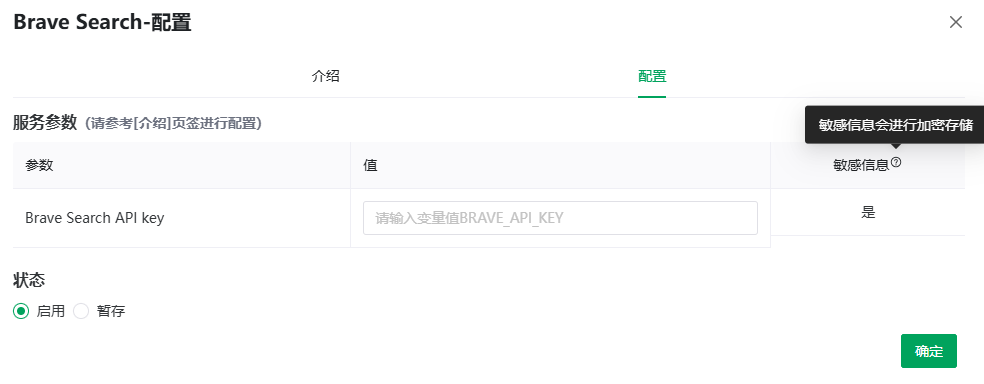
- Click Configure (Enable if never configured) to open the dialog:
- Intro tab: the service description (Markdown);
- Configure tab: the service parameters table (refer to the Intro tab) — parameter / value / sensitive; services needing nothing say "This service can be used without any parameters.";
- Fill in the values (input hint: "Enter the value for {parameter}");
- Set Status:
- Enabled: saved and active;
- Stash: draft only, not active;
- Confirm — "Configuration saved".
NOTE
Parameters marked sensitive (tooltip: "sensitive information is stored encrypted") such as API keys are stored encrypted in the database. Opening the settings form decrypts them for editing and returns the values to the frontend; encryption at rest does not prevent this authorized response.
Admin HTTP parameter bindings
For SSE and Streamable HTTP services, the admin selects HTTP binding (query or header) and an optional Request name for each preset or user-defined parameter. The parameter name remains the stable identifier for users' stored values. A missing bind_type defaults to Query and a missing bind_name defaults to name, so existing entries need no data migration. STDIO environment names keep their existing behavior.
A user-defined Header can use bind_value_template: "Bearer {value}" with bind_name: "Authorization"; {value} refers only to that definition's user value. Leaving the template unset uses the raw value. A preset Header uses its configured constant. Header values do not enter the URL; Query names and values are URL-encoded. Explicitly bound parameters must have nonblank scalar values; empty/unknown binding types, invalid templates, malformed headers and duplicate Header names (case-insensitive) are rejected. Duplicate explicit Query bindings are rejected; the legacy user-over-preset Query override is retained.
Users keep the same value-entry form. Save and re-open it when changing a token, then verify the service is enabled and selected for the intended character. HTTP transport request/response logging is disabled; this does not remove the settings response's documented decryption behavior. Share neither settings payloads nor unredacted tokens.
Using in Chat
Tools must be checked on a character to be callable (tooltip, translated: "Checked items mean this character may use the tools in those services"):
- Check them under Services & Tools (MCP) in Character Settings;
- Or click the Tools tag in the chat input bar ("Configure the services & tools for the character").
Once configured, the AI calls tools as needed.
WARNING
DeepSeek's deep thinking is mutually exclusive with tools/web search: with thinking on, "DeepSeek deep thinking does not support tool calls; disable deep thinking first" — or tool calling is auto-disabled.
API
The API item in the more menu generates a tools API key; /ext/v1/mcp returns the service list (all supported / active for the current user) — see API Reference · MCP Services.
Previous: Apps & Workflows · Next: Model Selection