Q&A Import & Generation
Q&A-mode documents use question-answer pairs as the retrieval unit: one answer can be associated with multiple questions, and hitting any of them recalls that answer — multiple questions, one answer — ideal for FAQs and support scripts. Pairs come from three sources, combinable:
| Source | Best for | Accuracy |
|---|---|---|
| File import | An already-curated FAQ sheet | High (manual) |
| AI generation | Only raw prose available | Medium (needs proofreading) |
| Manual maintenance | A few additions / fixes | High |
File Import
Way 1: upload when creating a Q&A document
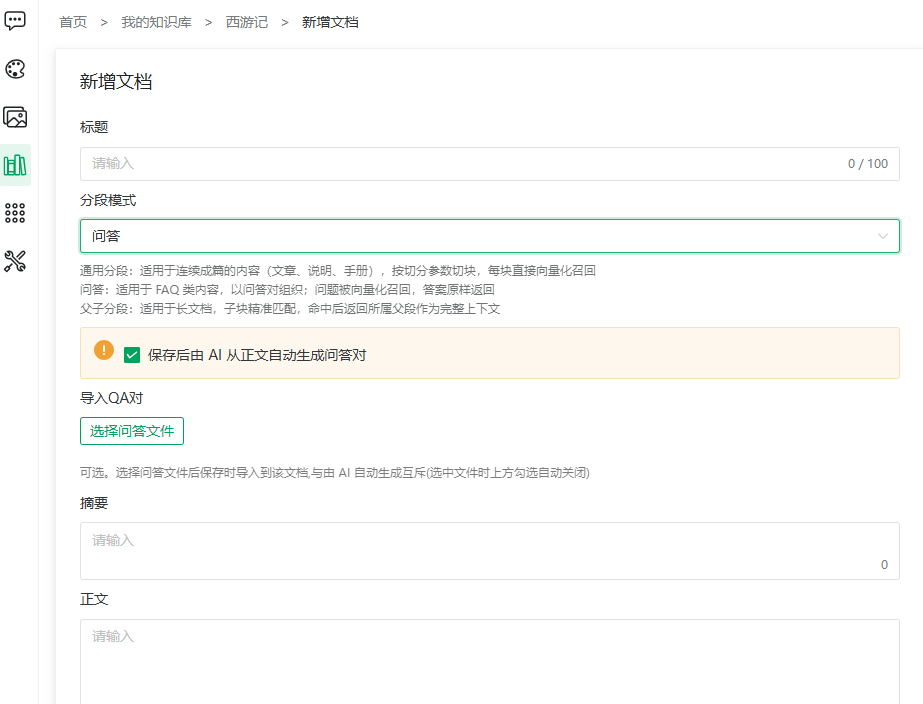
- In editing a document, set segmentation mode to Q&A and create new;
- Click Import Q&A pairs and pick an XLSX / CSV file;
- Save — the file's pairs are generated with the document.
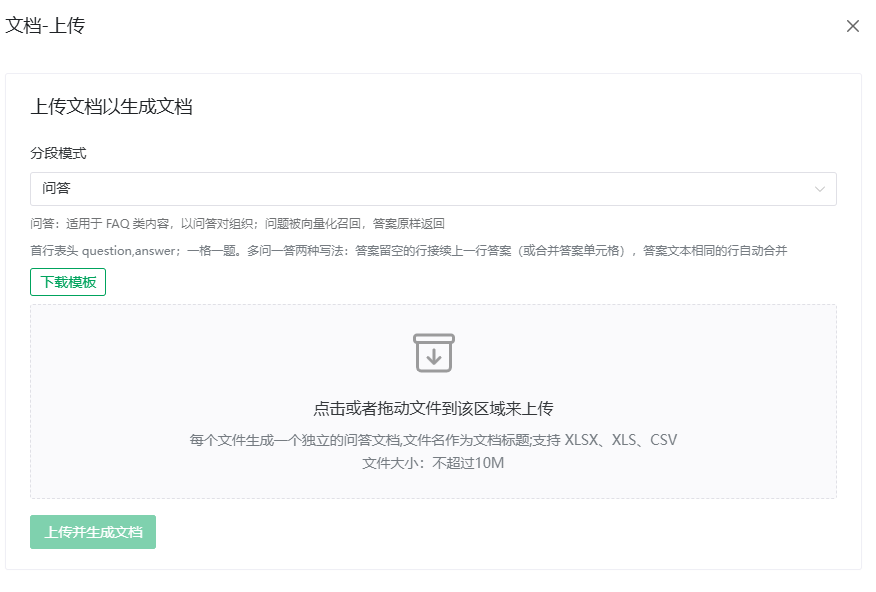
File format (in-app hint, translated):
- Header row
question,answer; one question per cell; - Multiple questions, one answer — two ways: rows with an empty answer continue the answer of the row above (or merge the answer cells); rows with identical answer text are merged automatically;
- Each file becomes one standalone Q&A document named after the file.
NOTE
Uploading a file is mutually exclusive with "AI auto-generation": picking a file unchecks AI generation automatically. Only one of the two can create the initial pairs.
Way 2: append to an existing document
- Open the document's segment management page (Q&A pair list);
- Click the header Import Q&A pairs (dialog "Import Q&A pairs into '{document}'");
- Pick an XLSX / CSV file — pairs are appended, existing content untouched.
AI-Generated Pairs
The AI distills pairs from the document body (using the base's ingest model):
- Check "Auto-generate Q&A pairs from the body after saving" when creating;
- Generation runs asynchronously; check the pair list shortly after.
Once pairs exist the control becomes "Clear current pairs and regenerate":
WARNING
Regenerating first clears all current pairs (including manual and imported ones), unrecoverable (confirmation required). Export a backup first if in doubt.
Manual Maintenance
Click Add Q&A pair in the pair list:
- Questions: one per line, +Add question for more rows;
- Answer: fill in;
- Save.
TIP
The in-app hint reads: "One answer can be associated with multiple questions; hitting any of them recalls the answer" — attach different phrasings ("how to claim expenses", "expense process", "reimbursement") to one answer to increase the hit rate.
Row actions on existing pairs: Edit (refills questions and answer), Disable / Enable, Delete.
Tips
- Official material, accuracy first → organize and import manually;
- Lots of existing prose → AI-generate first, then proofread each pair;
- New frequent questions after launch → append manual pairs or files; avoid regenerating everything.
Previous: Import Documents · Next: Segment Management